Logitech M196 Bluetooth Mouse Review: Light and Receiver-Free
Shop Owner's Analysis ·
Compiled by the store manager from official specs, listings and user feedback.


Price updated 2026/11/03. Actual price is subject to the Shopee listing.
Where to buy
Short on USB ports and always losing receivers? The Logitech M196 is pure Bluetooth and runs a long time on one AA.
Price updated 2026/11/03. Actual price is subject to the Shopee listing.
This page contains affiliate links. We may earn a commission at no extra cost to you. Please check Shopee/Amazon for current prices. Disclosure
By the Store Manager
At a café you open your laptop and realise the mouse receiver is at home.
Key points first
With few USB ports on thin laptops, a receiver-free Bluetooth mouse is handy.
The Logitech M196 is an entry Bluetooth mouse, cheaply priced on this Shopee Mall listing.

Logitech M196 key features & specs
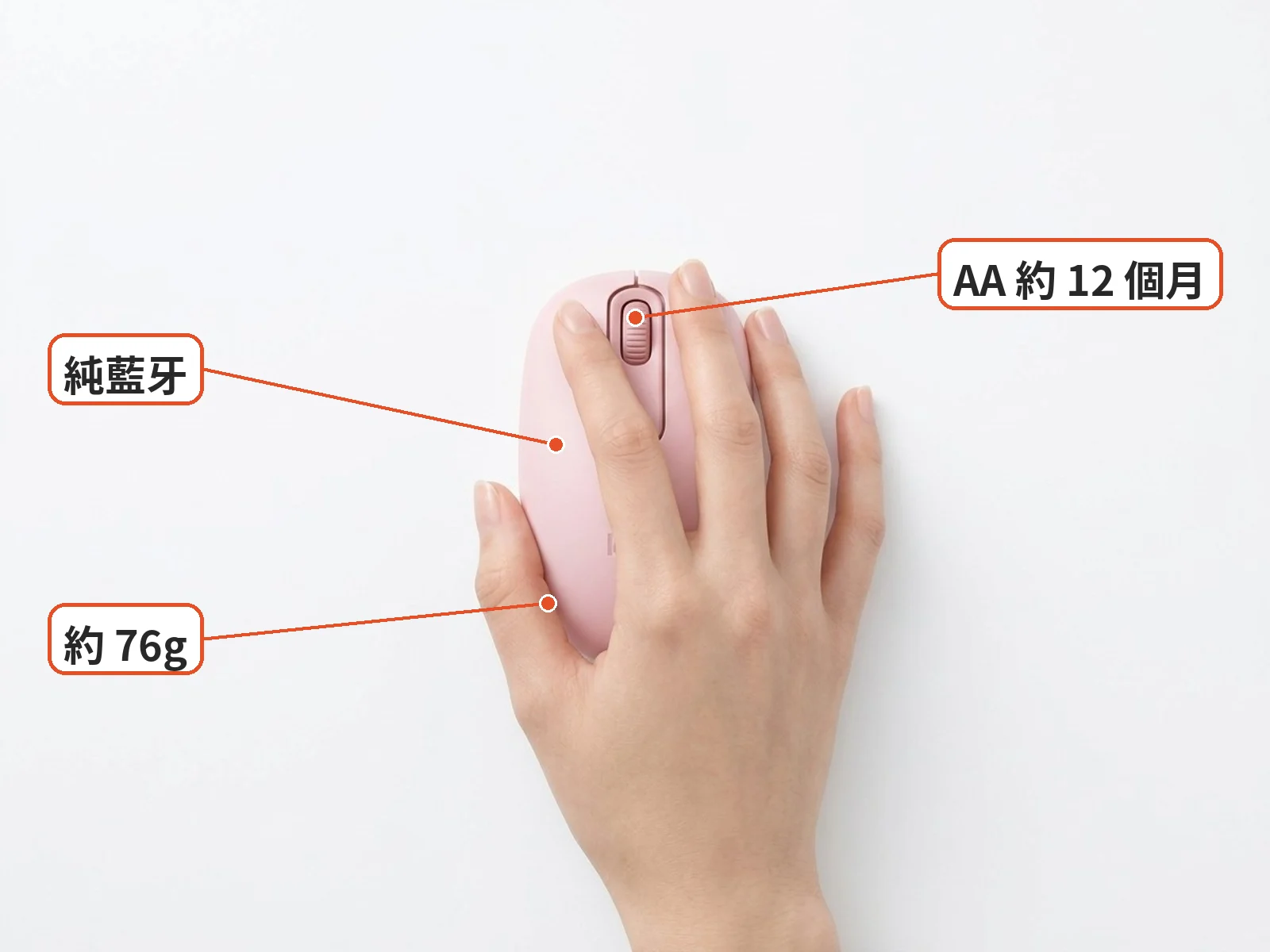
Per Logitech, it's pure Bluetooth with about 10 m range and no receiver.
It weighs about 76 g with battery and measures 100 × 60 × 38 mm.
It's ambidextrous with three buttons including the wheel, at 1000 DPI.
One AA battery is rated for about 12 months.
In use: everyday scenarios
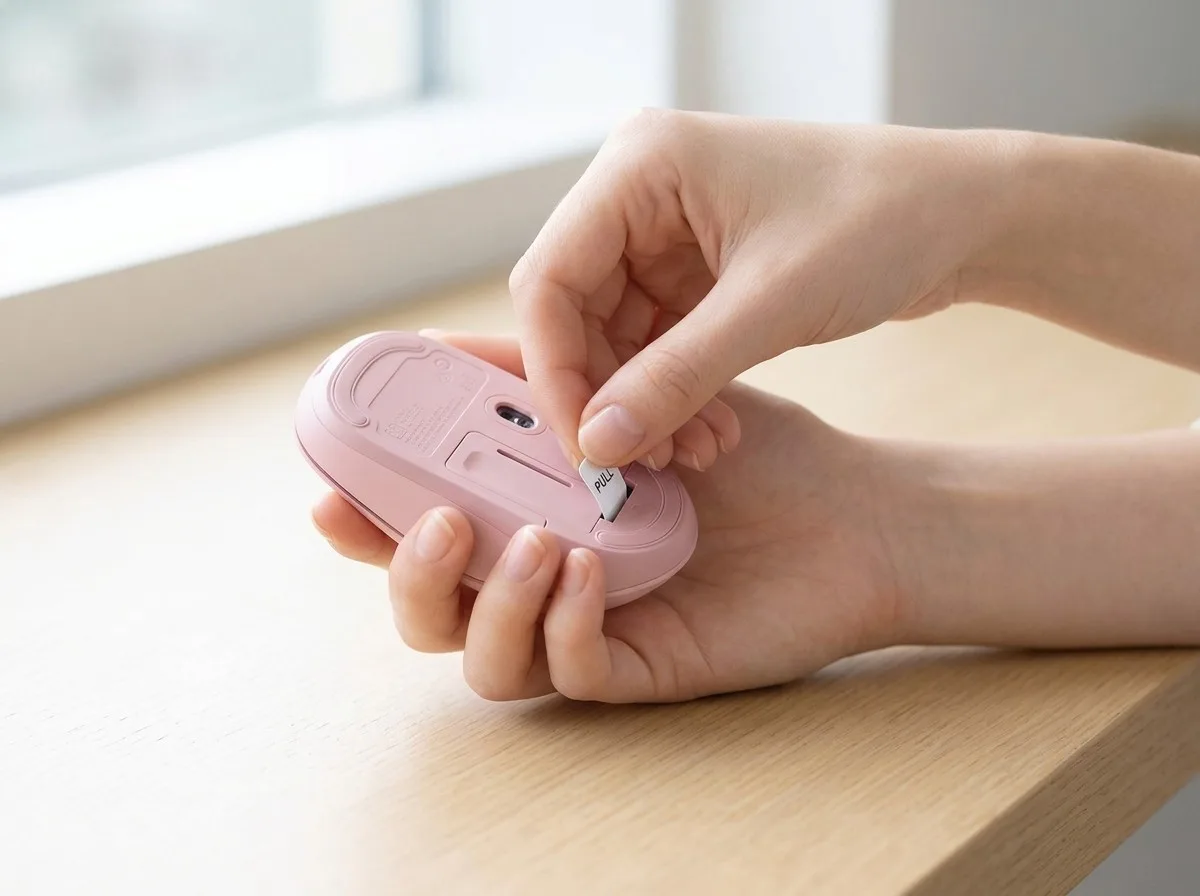
Pairing: pull the battery tab, hold the bottom button about 3 s, then connect in Bluetooth settings.
It has no side buttons, no DPI switching and no multi-device switching.
It won't track on glass; use a pad.
Reviews praise it as cheap, light and pure Bluetooth; some find the flat shape less supportive and the clicks not silent.

Store manager's take
It suits office work, browsing and classes, not gaming.
Pick a colour from the listing to match your laptop.
It's a light, receiver-free entry Bluetooth mouse.
See the alternatives below.
What users say about the Logitech M196
Overseas user reviews: a Kakaku.com buyer found the M196 light and handy but wished for a tilt wheel. Testberichte.de's roundup praises it as cheap, light and pure Bluetooth. Some note the flat shape gives modest support for long sessions and the clicks aren't silent.

Similar alternatives
- Logitech M240 Silent: quieter clicks; check the listing.
- Logitech Pebble Mouse 2 M350s: slimmer, multi-device; check the listing.
- Logitech M331 Silent Plus: with receiver; check the listing.
Before you buy
In short, the Logitech M196 is pure Bluetooth, about 76 g and runs about 12 months on one AA; check price on Shopee.
Specs
| Item | Detail |
|---|---|
| Connectivity | Bluetooth, about 10 m, no USB receiver (per Logitech) |
| DPI | 1000 (per Logitech) |
| Buttons | 3 buttons incl. wheel, ambidextrous |
| Battery | 1 AA, about 12 months (per Logitech) |
| Size & weight | 100 × 60 × 38 mm, about 76 g with battery (per Logitech) |
| Seller | Shopee Mall direct (per listing) |
Pros
- No receiver, saves a USB port
- Light and portable
- Ambidextrous
- Long battery life
Cons
- No side buttons
- No DPI switching
- No multi-device switching
- Doesn't work on glass
Where to buy the Logitech M196
Prices and specs: check the Shopee listing.
Compiled by the store manager from official specs, listings and user feedback.
Some images are illustrative
Affiliate disclosure: this article contains Shopee affiliate links. UnboxRank may earn a commission at no extra cost to you.
FAQ
How to pair?
Pull the battery tab, hold the bottom button about 3 s, then connect in Bluetooth settings.
Glass desk?
No; use a mouse pad.
Gaming?
Not really; it's for office work and browsing.
Two computers?
No multi-device switching; re-pair to switch.
Related articles

Tech & Gadgets
Shop owner's pickAnker Prime 200W Charger A2683 Review: One Brick for the Whole Desk
Desk buried under chargers? This 4C2A, 200W desktop brick lets laptop, phone and tablet charge side by side.

Home & Living
Shop owner's pick3M Command General Purpose Hooks Review: Hang Without Drilling
Renting and can't drill? 3M Command hooks come in 8 sizes; pick the right weight rating and they're handy.

Motorcycle & Car Accessories
Shop owner's pickCastrol POWER1 Scooter 4T 10W-40 Review: A Commuter Pick
Commuting on a scooter every day? Castrol POWER1 Scooter is made for scooters; check your manual before you order.

Sports & Outdoors
Shop owner's pickDecathlon Run 100 Dry Running T-Shirt Review: Budget Sweat-Wicking
Soaked after one summer jog? Decathlon's Run 100 Dry tee wicks sweat, dries fast and is cheap enough to own a few.
Some images are illustrative.