Creative Pebble V3 USB-A vs USB-C: Audio and Power
Buying Guide Notes · First published:
Compiled from public sources · Written using published specs and user feedback.
As an Amazon Associate I earn from qualifying purchases.

The Creative Pebble V3 can carry USB audio through either its USB-C plug or the included USB-A adapter, provided the computer connection supports data. The more important distinction is available power: a USB-C-shaped socket does not automatically guarantee the speaker’s highest output, and a compatible USB-A supply is not automatically the weaker option. Choose the connection around your computer’s data and power capabilities, rather than buying another adapter just for its shape.
Checked November 15, 2026. This comparison is compiled from public sources; we did not listen to these speakers, measure their output, or test a particular computer. The selected black MF1700 pair is Amazon ASIN B08F57GSJ7. Its new offer was $42.74, sold by Creative Labs, Inc. and shipped by Amazon, with 4.4 stars from 6,017 ratings. Those are a dated listing snapshot, not a promised checkout price or an independent performance score.
AI-generated illustration: the cover shows an illustrative desktop arrangement, not an audio test or proof of connection compatibility.
Quick Verdict: should you use USB-A or USB-C?
Use the port you already have if it carries data and supplies suitable power. Creative includes the USB-C-to-USB-A converter, so a desktop without USB-C does not automatically require another purchase. Check the gain setting and the power source before deciding the speakers are underpowered.
The V3 is for someone who wants a compact stereo pair for a desk and appreciates USB audio plus optional Bluetooth. Skip it if you want a rechargeable travel speaker, a subwoofer system, or guaranteed compatibility with an unspecified dock. All three are different purchasing requirements.
| Connection or alternative | Price at check | Key requirement | Best for | Who should skip it |
|---|---|---|---|---|
| Pebble V3 through computer USB-C | Same $42.74 pair | Data-capable computer port; adequate power | A computer with a suitable free USB-C port | Someone assuming every USB-C charger carries computer audio |
| Pebble V3 through included USB-A converter | Same $42.74 pair; converter included | Computer data port; check power and gain | Older desktops and laptops | Someone expecting an adapter to increase a port’s available power |
| Pebble V3 Bluetooth or analog input | Same pair; extras not priced here | USB power remains necessary; AUX cable is not included | A separate audio source and suitable power arrangement | Anyone wanting completely cordless use |
| Keep existing speakers | No new speaker purchase | Existing connection already meets your needs | Avoiding an unnecessary replacement | Someone who specifically needs the V3’s additional input options |
These are ways to use the same product, not separate USB-A and USB-C editions. We did not verify a current accessory price range or invent one for the table.
Does the USB-A adapter carry sound, or only power?
Creative’s current product page explicitly says the V3 supports USB audio, including through the supplied USB-C-to-USB-A converter. The computer must still provide a USB data connection and select the speakers as its audio output. A wall charger supplies power; it does not become a digital audio connection to a nearby computer simply because it has the same connector.
This distinction also matters when searching older discussions. Creative says the original Pebble and Pebble V2 do not provide the same USB-audio function. Advice to connect a separate analog audio lead may describe those products. A forum title containing only “Pebble” is not enough to identify the V3’s wiring requirements.
Before buying, identify your exact computer port, whether an adapter is already included in your selected package, and which input you intend to use. That is a more useful compatibility check than counting the number of USB-C ports on the case.
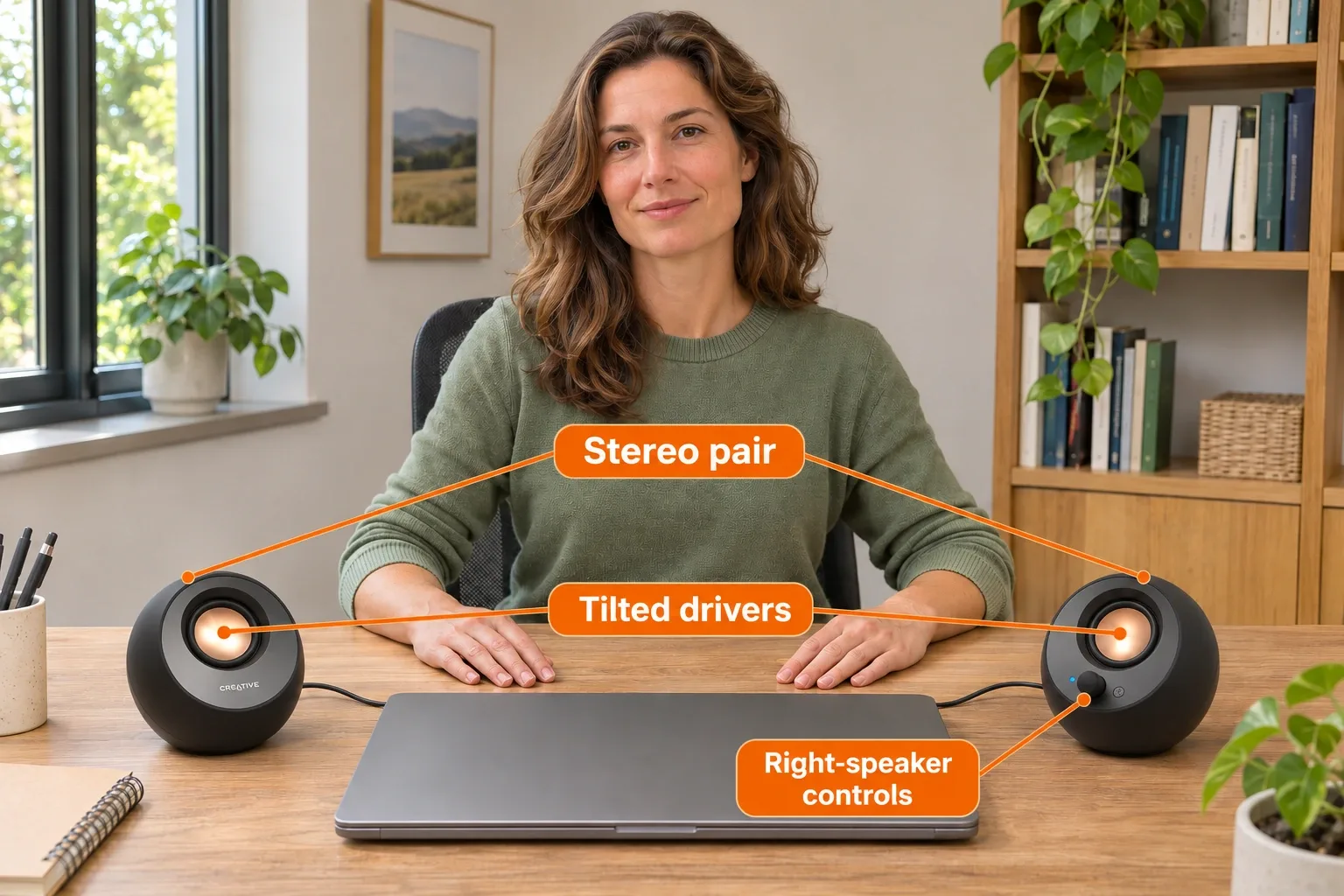
AI-generated illustration: orange labels identify the stereo pair, tilted drivers and right-speaker controls. The image does not show measured output or every cable connection.
Will USB-C always make the V3 louder?
No connector shape alone establishes the available power. Creative advertises up to 8W RMS total and 16W peak under its specified higher-power conditions. The product information describes a suitable 10W USB-C source or 5V/2A USB-A source with the relevant gain configuration. RMS and peak figures are different specifications; neither is our measured listening result.
Creative’s model-specific support FAQ says a certified USB-C connection can enable the higher output automatically, while USB-A use requires attention to the Auto/High gain setting and power source. That does not mean every USB-A socket supplies 2A, or that every USB-C-shaped socket supplies the advertised power. A converter changes the physical connection, not the computer’s power budget.
If your desk is already crowded with a dock, hub and several accessories, inspect those devices’ specifications rather than assuming the speakers receive the maximum available power. Creative’s USB setup guidance favors a direct computer connection. A direct connection is a sensible first comparison when investigating a problem, but it is not proof that all docks fail or that changing ports will solve every dropout.
Can Bluetooth make the speakers wireless?
The V3 supports Bluetooth 5.0, but Bluetooth removes the audio cable requirement, not the need for USB power. The two speakers are also linked by their interconnecting cable. There is no rechargeable battery that turns this pair into a portable speaker set.
For a buyer, this means Bluetooth can be useful when playing audio from a phone while the speakers remain powered at a desk. It does not let you put the pair across a room without considering power and cable placement. Analog 3.5mm AUX is another input option, but Creative’s package list does not include the AUX cable or a power adapter.
Do not count those optional arrangements as free accessories. Work out which cables and power source you already own before comparing the pair’s total cost with an alternative.

AI-generated illustration: a desktop listening scenario with the same woman and speaker pair; no sound quality, software setup or cable performance was tested.
What stands out on a small desk?
Creative lists each speaker at approximately 123 × 120 × 118mm. The tilted drivers and controls on the right speaker give you a compact, straightforward desktop layout. The published USB cable length is 1.2m and the inter-speaker cable is 1.35m, so placement still needs planning even though the bodies are small.
The included converter is a practical advantage for a mixed generation of computers. You can evaluate USB-A and USB-C connections without immediately ordering a separate branded adapter. Bluetooth and AUX also give the pair more flexibility than a single-input design, provided you accept the power requirements.
For gifting, ask what device the recipient actually uses. A compact speaker pair can be useful for a desktop computer with modest built-in sound, but the product name does not establish compatibility with every console, monitor or television. We have not verified those setups here.
Where does it fall short?
The most obvious limitation is the gap between “USB powered” and “maximum advertised output on my port.” Reading the source’s output specification and the speaker’s gain guidance is additional work. The pair also occupies a computer port during USB audio use, and its fixed cable layout gives less freedom than independently powered wireless units.
It is also easy to overbuy on the strength of a wattage number. We have not measured distortion, bass extension or useful volume at a particular distance. Choose the V3 for its documented size and connection options; do not treat the 16W peak label as a promise that it will perform like a larger speaker system.
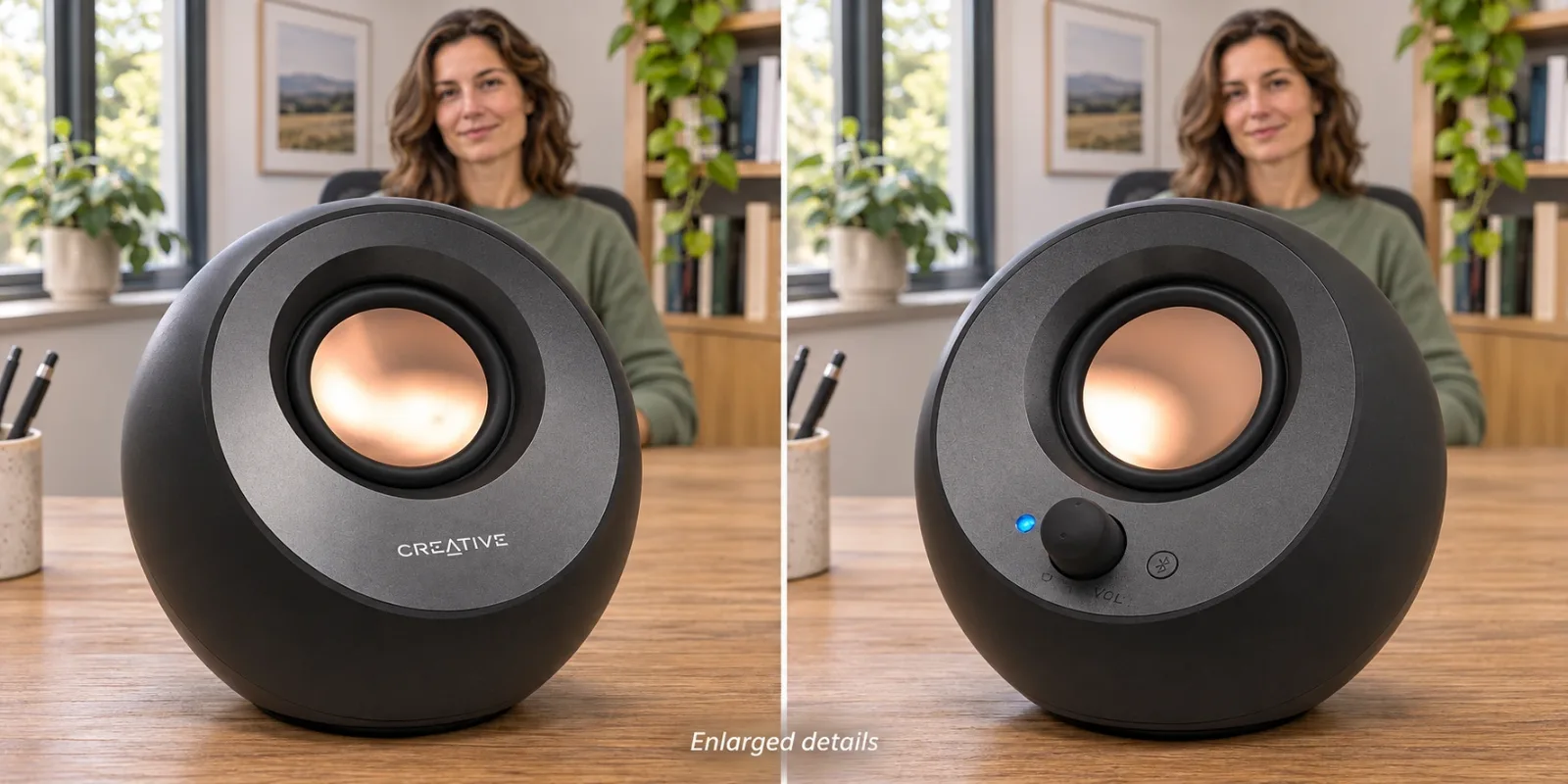
AI-generated illustration: two enlarged exterior details show a driver and the right-side control area. Enlarged views are not life-size measurements.
What Owners Say about USB power and reliability
- Compact pair, with a port preference. DV2FOX’s May 14, 2024 follow-up said they liked the V3 but wished their computer could provide a little more output through its USB-A arrangement. This is one owner’s computer-specific impression, not evidence that all USB-A connections are weaker.
- Dock-related dropouts remain a consideration. In a January 17, 2025 post, throwawayyyayyyyy described V3 disconnections with firmware 3.3 and a USB-C Thunderbolt docking station. The thread does not establish a universal cause or a guaranteed fix.
Both posts name the V3, but neither verifies our exact current Amazon shipment. These are individual, untested accounts rather than a failure rate or owner consensus. We excluded sales-only posts and did not treat suggested troubleshooting in replies as a tested solution.
Which connection should you choose before checkout?
Choose USB-C when you have a suitable free computer port and prefer the direct plug. Choose the supplied USB-A converter when that matches your computer, then verify the source’s power and the gain instructions. If you need Bluetooth, budget the desk space and USB power arrangement too.
If your existing speakers already work well, keeping them is a reasonable alternative. If you need a battery-powered device or a system for a much larger space, start with that requirement rather than trying to make a desktop USB pair fit a different job.

AI-generated illustration: portrait with the same desktop pair at approximately the manufacturer’s stated body scale; it is not a hands-on endorsement.
How We Researched This
We checked Creative’s current US product page, its MF1700 power/gain FAQ and USB connection guidance against the selected Amazon offer on November 15, 2026. We separately searched and read public owner discussions, retaining their dates, computer context and limits. No listening, electrical, latency or long-term reliability testing was performed. This comparison is compiled from public sources.
Pros
- + USB audio through USB-C or the included USB-A converter
- + Compact stereo pair with Bluetooth and analog input options
- + Manufacturer provides model-specific power and gain guidance
Cons
- - Maximum advertised output depends on power source and gain
- - Bluetooth still needs USB power; no rechargeable battery
- - Dock compatibility and audio performance were not tested
Sources and verification status
Verification status: compiled from public sources
Data updated:
Verified on:
- Creative Pebble V3 current US product page: dimensions, inputs and contents
- Creative MF1700 power and gain FAQ, localized support page
- Creative USB audio setup guidance
- Selected black MF1700 new offer, checked November 15, 2026
- DV2FOX V3 follow-up, May 14, 2024
- V3 docking-station dropout account, January 17, 2025
FAQ
Does the included USB-A converter carry USB audio?
Creative says the V3 supports USB audio through its USB-C plug and included USB-A converter. The computer connection must support data. A wall charger alone cannot carry audio from your computer.
Is USB-C always louder than USB-A?
No. Creative’s maximum-output conditions depend on adequate power and the appropriate gain configuration. Its guidance includes a suitable 5V/2A USB-A source; connector shape alone does not establish available power.
Does Bluetooth use a rechargeable battery?
No. Bluetooth is an audio input option, but the Pebble V3 still requires USB power. The speaker pair also has an interconnecting cable.
Is an AUX cable or power adapter included?
Creative’s current package list includes the speaker pair, USB-C-to-USB-A converter and documentation. It does not include an AUX cable or a power adapter.
Did UnboxRank test USB-A against USB-C sound quality?
No. This comparison is compiled from public sources. We did not conduct listening, output-power, dock, latency or reliability tests, and the owner reports describe individual setups.
You might also like

Electronics
Buying guideBeats Solo 4 USB-C Audio: Battery and Cable Limits
USB-C audio charges from a supported source; the 3.5 mm cable provides the battery-free fallback. Check the exact mode before buying.

Electronics
Product analysisAnker Nano II 65W Raises the Power, Not the Port Count
The $29.99 Nano II adds notebook power, while the $18.99 Nano 30W includes a cable for a simpler phone kit.
Electronics
Buying guideTALIX 190W Power Bank: Why One Port Tops Out at 140W

Electronics
Product analysisLogitech R400 Review: A Useful Presenter Gift—Until the Laptop Has Only USB-C
A straightforward slide remote for a compatible Windows setup, with USB-A and physical-laser limitations to settle before gifting.