Logitech R400 Review: A Useful Presenter Gift—Until the Laptop Has Only USB-C
Buying Guide Notes · First published:
Compiled from public sources · Written using published specs and user feedback.
As an Amazon Associate I earn from qualifying purchases.

Pros
- + Physical previous/next slide controls
- + Receiver stores in the remote
- + Replaceable AAA batteries
- + No software installation for the supported basic connection
Cons
- - USB-A receiver can require a separate adapter
- - Current official system list specifies Windows
- - Physical laser is less visible on some flat-panel screens
- - Published range is conditional, not an event-reliability guarantee
Sources and verification status
Verification status: compiled from public sources
Data updated:
Verified on:
Checked November 11, 2026 (Taipei). This analysis is compiled from public sources. We checked the selected Amazon offer, Logitech’s current specifications and dated owner reports; we have not physically tested or unboxed this remote.
Quick Verdict
The R400 is a focused gift for a teacher, trainer or colleague who already presents from a compatible Windows computer. Physical slide controls let the presenter leave the keyboard, while the receiver tucks into the remote afterward. The purchase hinges on two easily missed details: the connection is USB-A, not Bluetooth, and the red laser is a physical spot rather than a digital pointer for every screen or video call.
Exact Model and Buying Checks
| Detail | What this selection offers |
|---|---|
| Model / ASIN | Logitech R400 / B002GHBUTK |
| Connection | Proprietary 2.4 GHz receiver with USB-A |
| Manufacturer body dimensions | 115.5 × 37.8 × 27.4 mm |
| Power | Two AAA batteries |
| Official system list checked | Windows 10, 11 or later; available USB port |
| Advertised operating distance | About 50 ft / 15 m, conditions apply |
Amazon showed an In Stock new offer sold and shipped by Amazon.com for sample ZIP 10001. That observation does not guarantee the same seller, total or delivery at checkout. We omit the changing price and do not treat a holiday delivery estimate as a promise.
What Stands Out
A clear job for the buttons
A presentation remote is a better gift when it solves an existing routine. Someone repeatedly returning to a laptop to advance a slide may appreciate a handheld control more than another general-purpose desk accessory. R400’s previous and next controls are distinct from moving a mouse cursor across a desktop.
This is also why it is worth asking how the recipient presents. A speaker reading notes on one fixed laptop may gain little; a trainer moving around a small room has a more obvious use. The tool changes where the presenter can stand, not the quality of their slides or delivery.
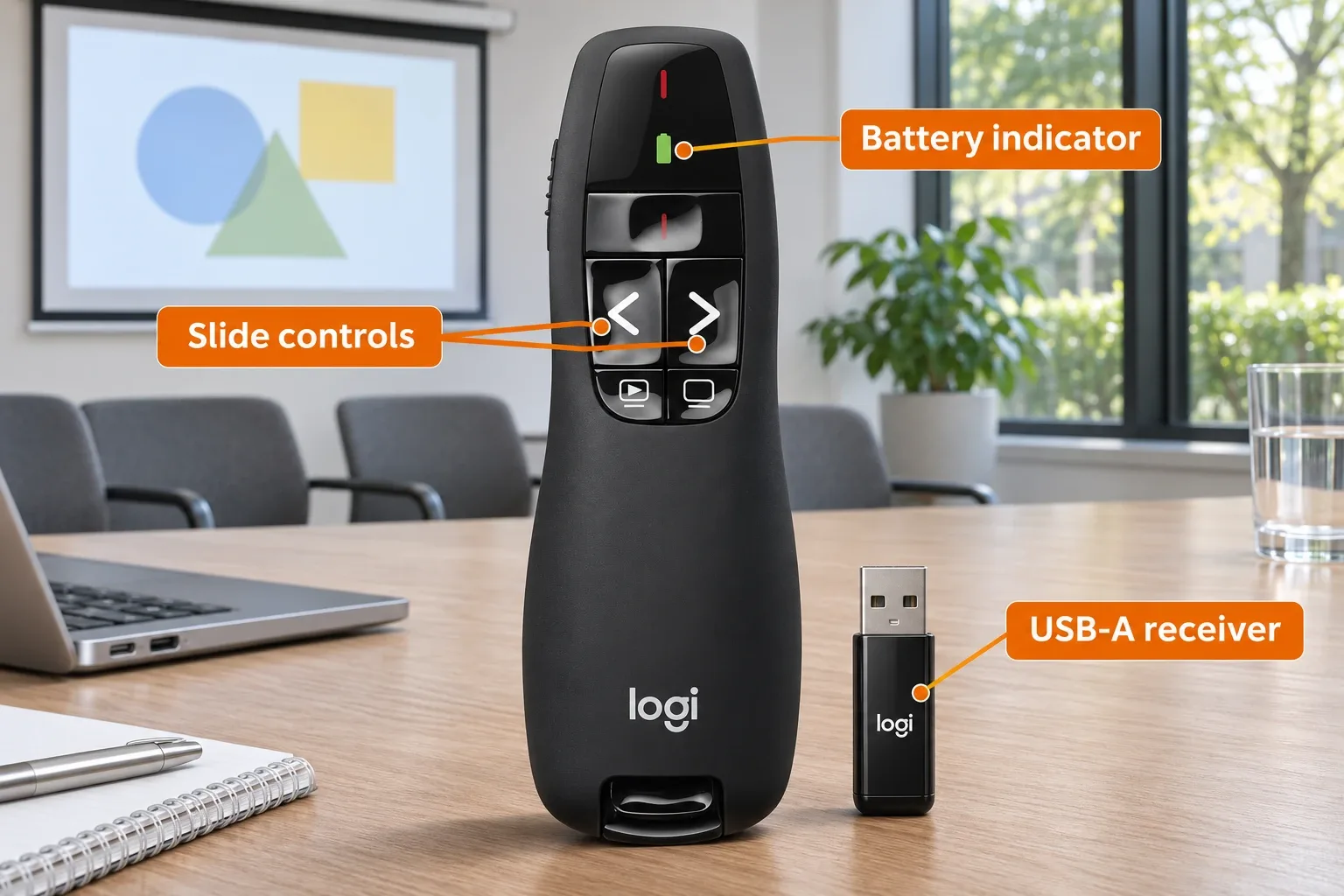
AI-generated illustration — the R400 controls and receiver identified with orange labels. Enlarged details, not scale measurements.
Receiver storage helps the packing routine
Logitech provides a place to store the receiver inside the remote. A dedicated packing habit can reduce the chance of arriving with the handheld unit but leaving its connection behind. It is still a removable part, so make checking the receiver part of the pre-event routine.
Replaceable AAA power can suit someone who prefers carrying spare cells to remembering a charging cable. It is not evidence of lower lifetime cost. Logitech’s different maximum battery figures for laser use and slide control are very different scenarios; we would not turn either into a prediction for mixed everyday use.

AI-generated illustration — the same presenter practicing in a small meeting room. Fictional rehearsal; laser off.
Where It Falls Short
USB-A is a real compatibility decision. A modern laptop with only USB-C ports needs an appropriate adapter or hub. That creates another item to pack and another connection to check. The receiver is not Bluetooth and is not automatically interchangeable with every other Logitech receiver.
The laser is not a universal display pointer. Logitech notes reduced visibility on LCD and plasma screens. A physical spot on a room screen is also different from a cursor embedded in a screen share. For a largely remote audience, software pointing tools may fit the actual presentation better.
The listed wireless distance is conditional. Furniture, the computer arrangement and the venue can all differ from a simple rehearsal. We have not measured range, interference tolerance or missed clicks, and would not choose it solely because an advertised distance exceeds the length of a room. Test the actual deck and equipment before guests arrive.
R400 contains a Class 2 laser. Follow the current instructions and warning label; do not direct it at people or eyes. The images keep the laser off and do not demonstrate a laser-safety test.
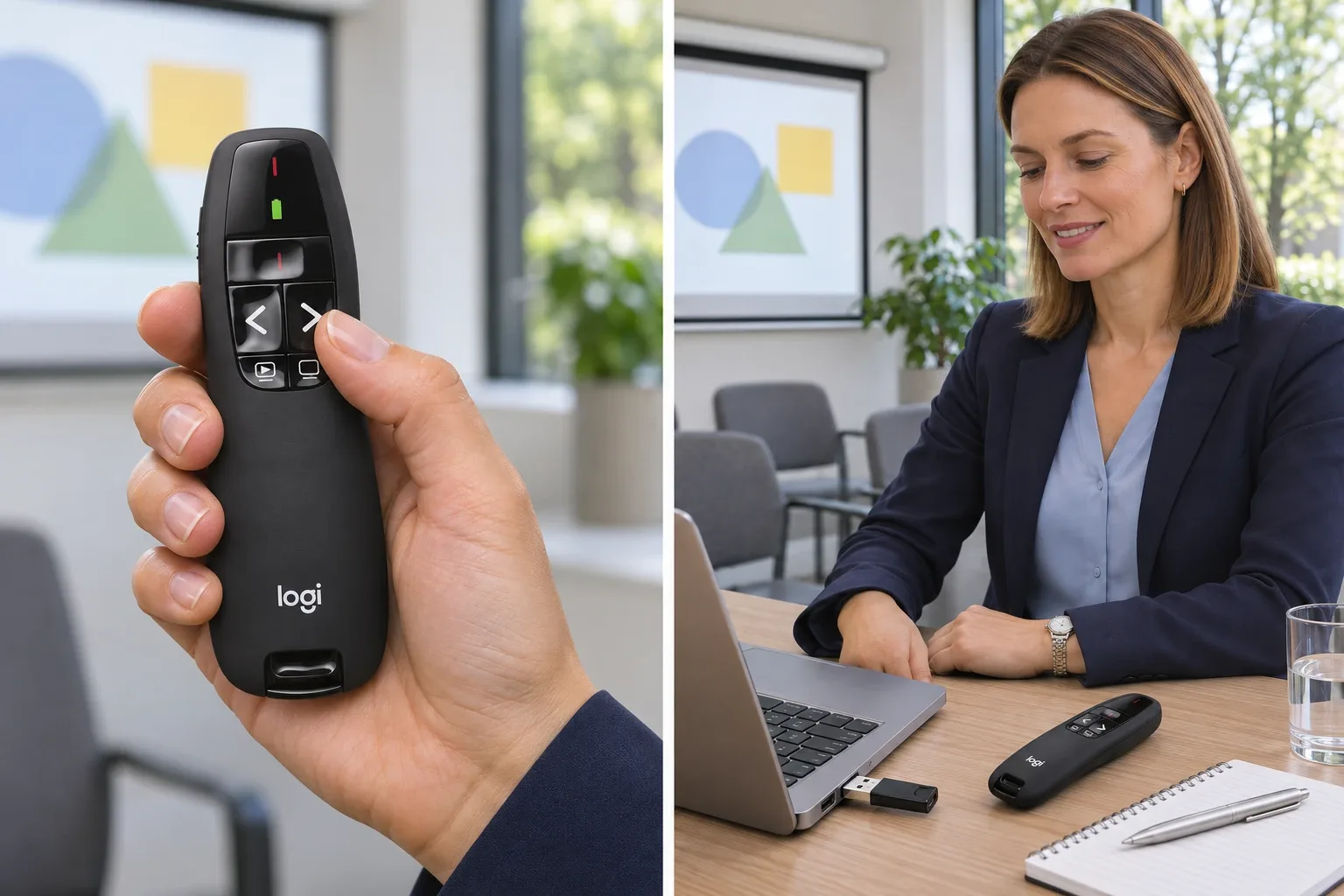
AI-generated illustration — enlarged button and USB-A receiver connection details. Enlarged details, not scale measurements.
What Owners Say
- A teacher reported long service. In a July 8, 2019 comment, a participant described years of use of both R400 and R800 and said the remotes worked with their slide tools. The R800 has different features. This is an older individual account, not proof of current macOS support or the lifespan of a new R400.
- A different setup had repeated problems. A February 5, 2025 comment in a professional AV discussion reports recurring R400 issues while asking about Mac-and-adapter use. The writer did not establish a single fault cause, distance or hardware revision. It is a reason to rehearse the full setup, not a quantified failure rate.
We retained contrasting firsthand reports and excluded deal bots, empty reposts and generic retailer-review summaries. Purchase history, production revision and undisclosed incentives cannot be independently verified from these comments alone. Other replies about Spotlight or R800 are not tests of this model.
Who It’s For
Choose it for a recipient whose computer and presentation habits you know: supported Windows use, access to USB-A and a preference for simple physical buttons. A work-themed Christmas gift feels more thoughtful when it matches the room and software they actually use.
Skip it as a blind purchase for someone presenting only from a tablet, needing Bluetooth, expecting a visible pointer inside a video call, or relying on guaranteed current Mac support. A presenter with high-stakes stage requirements should assess a complete cueing and backup arrangement rather than treating this consumer remote as an event system.

AI-generated illustration — the same presenter beside her laptop and R400. Fictional rehearsal; laser off.
Alternatives to Consider
| Route | Why it may fit better | Check before buying |
|---|---|---|
| Bluetooth-capable presenter | Avoiding a USB-A receiver | Exact OS, app and button support |
| Digital-pointer remote or software tool | Pointing within a screen share or flat-panel setup | Software permissions and compatibility |
| Existing keyboard or mouse | Mostly stationary presentations | Whether leaving the desk is actually useful |
| Professional cueing system | Complex stages and backup computers | A different workflow and purchase category |
These are use-based alternatives, not measured winners. Do not transfer R400’s connection or power details to another model because both are sold as Logitech presenters.
How We Researched This
We matched the selected ASIN and product appearance, observed the Amazon offer and expanded Logitech’s current specification panel. We checked public comment dates and linked each owner account individually. This is an editorial buying analysis, not an RF, battery, laser or compatibility test. Our five AI-generated illustrations show a fictional rehearsal with the laser off; the laptop and room are props.
Sources
- Logitech R400 specifications, system requirements and screen-visibility caution
- Selected Amazon model and current offers
Dated community links are attached to their numbered summaries above.
FAQ
Does R400 connect over Bluetooth?
No. This model uses Logitech’s proprietary 2.4 GHz USB-A receiver. It does not appear in Bluetooth pairing simply because it is wireless.
Will it work with a USB-C-only laptop?
A suitable USB-C-to-USB-A adapter or hub would be needed for the supplied receiver. That adapter is not established as included. Check the actual computer, port and presentation setup before an important event.
Is macOS officially supported on the current product page?
The current Logitech page lists Windows 10, 11 or later with an available USB port. Some public users report other setups working, but that is not a current manufacturer promise of macOS compatibility.
Does the laser create an on-screen pointer for a video call?
No. It is a physical red laser, not a software cursor. Remote viewers see the shared computer image, so do not assume they will see a spot projected onto a room screen. Logitech also warns that laser visibility is reduced on LCD and plasma screens.
What batteries and wireless range does Logitech list?
Two AAA batteries power R400. Logitech lists approximately 50 feet / 15 meters, subject to environmental and computing conditions. Its maximum battery figures differ greatly between laser and presenter use; they are not a guarantee of runtime for your habits.
Price and purchase links
You might also like
Electronics
Product comparisonCreative Pebble V3 USB-A vs USB-C: Audio and Power
Electronics
Buying guideTALIX 190W Power Bank: Why One Port Tops Out at 140W

Electronics
Buying guideBeats Solo 4 USB-C Audio: Battery and Cable Limits
USB-C audio charges from a supported source; the 3.5 mm cable provides the battery-free fallback. Check the exact mode before buying.
Sports & Outdoors
Product analysisBlack Diamond Moji Review: A Small Camp Lantern Gift Without Charging Fuss
The regular Graphite Moji is a compact 200-lumen lantern with replaceable AAA power. Check the battery setup, model name, and Amazon seller before wrapping one.