DTAudio WM200 Vertical Mouse Review: Easier on the Wrist?
30-second verdict
Wrist aches after a day on the mouse? Check the DTAudio WM200 vertical mouse's 62° tilt, size and buttons before deciding if it fits your hand.
Who it suits
It suits people who mostly do office work, use a mouse for long hours, and want to try a vertical grip cheaply.
It doesn't suit people who need Bluetooth or multi-device switching, competitive gamers, or people with clearly small hands who can't try one first.
Buying Guide Notes ·
Compiled from public sourcesCompiled from official specs and user feedback.

Pros
- 62° tilt keeps the hand upright so the wrist isn't pressed flat
- Quiet clicks for offices and late nights
- 400mAh battery with Type-C charging, in six colors
Cons
- 2.4G receiver only, no Bluetooth
- The vertical grip takes getting used to; some people feel forearm or hand strain
- Few long-term Taiwan reviews yet; the warranty is only 3 months
Price and purchase links
Wrist aches after a day on the mouse? Check the DTAudio WM200 vertical mouse's 62° tilt, size and buttons before deciding if it fits your hand.
Price updated 2026/11/04
Where to buy
The DTAudio WM200 is about NT$299, with about 336 sold a month. Prices change, so check the amount and color before you pay.
NT$299 | See the lowest price →
UnboxRank compiles official specs and user feedback.
Some images are AI-generated illustrations
Specs
| Item | Detail |
|---|---|
| Product | DTAudio WM200 ergonomic wireless silent vertical mouse |
| Look | Vertical grip, about 62° tilt, silver-white wheel, DPI key below the wheel, thumb forward/back keys |
| Colors | Black, taupe, light grey, blue-purple, mint, pink |
| Connection | 2.4G wireless receiver, about 10 m |
| Buttons/DPI | 6 buttons; 800/1200/1600 DPI |
| Battery | 400mAh, Type-C charging |
| Size/weight | About 67×83×116 mm, about 94g |
| Systems | Windows, macOS |
| Price | About NT$299; prices change |
After a full day on the mouse, your wrist wants to roll and your shoulder tightens too. If you're looking at the DTAudio WM200, the real question is whether a 62° tilt actually hurts less, or just moves the ache somewhere else.
What the DTAudio WM200 looks like
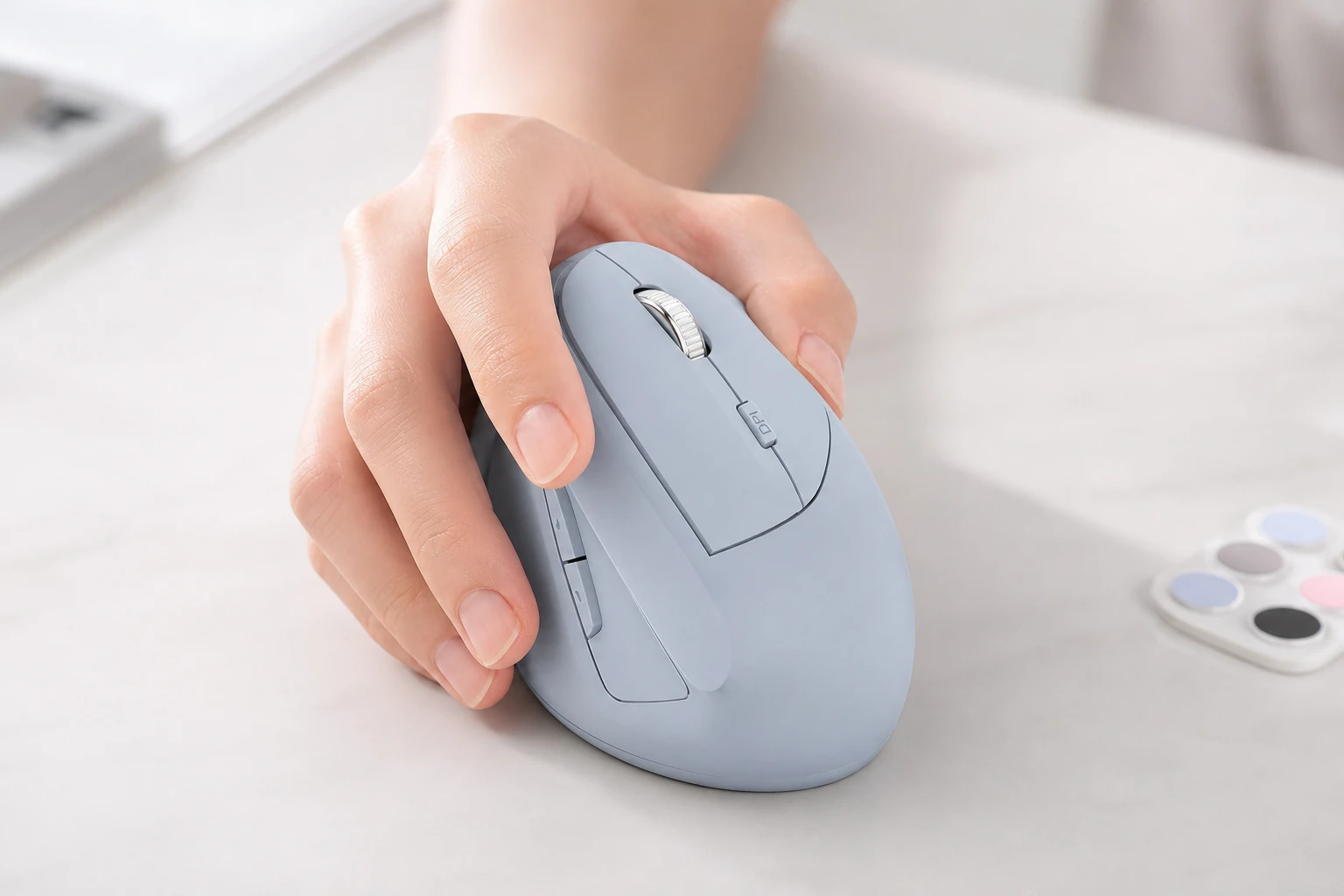
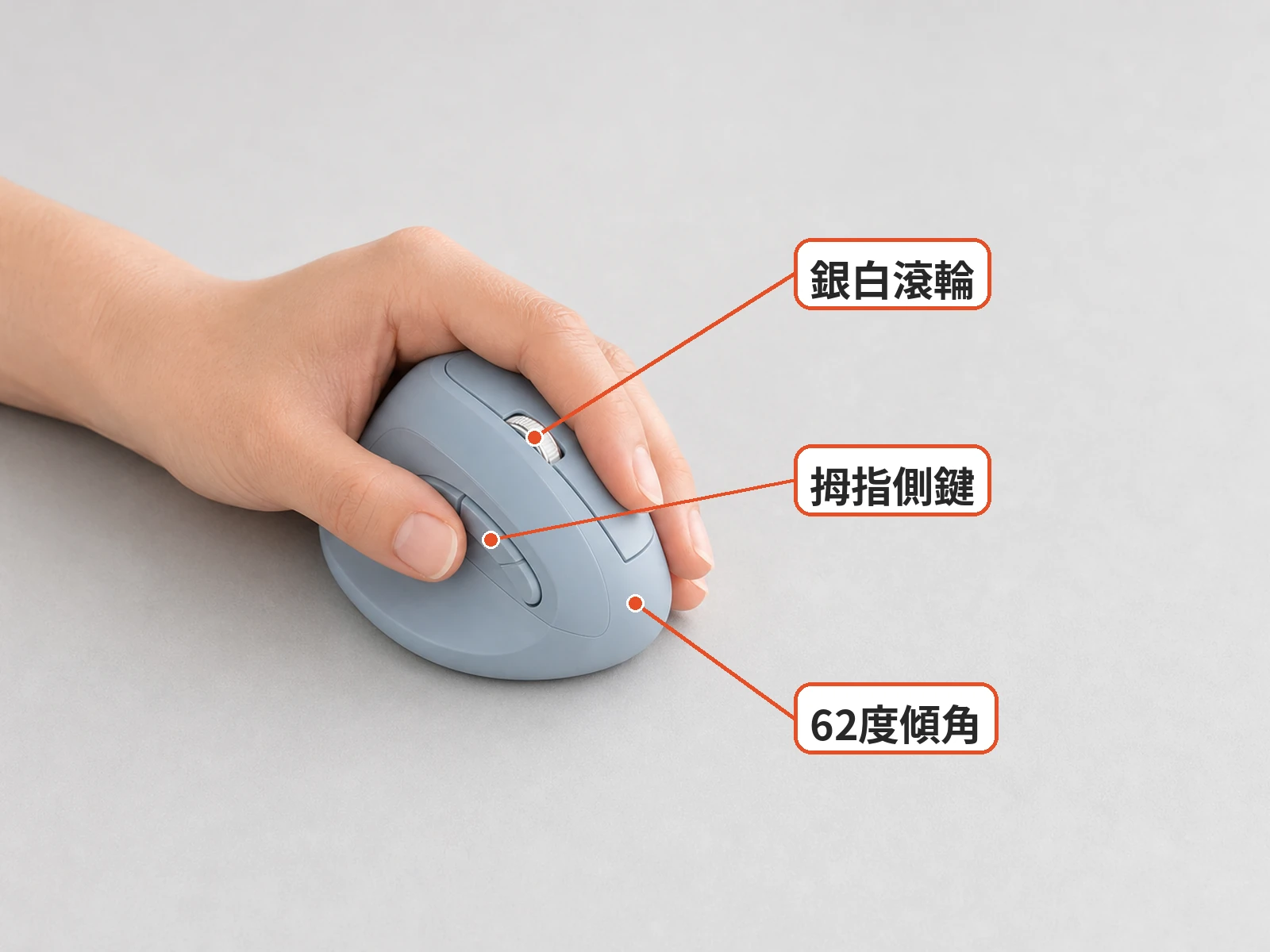
The WM200 has an upright grip tilted about 62°, so your hand sits as if you're shaking someone's hand. A silver-white wheel sits on top with a DPI key below it, and forward and back keys sit under the thumb, for six buttons in total. The shell is matte with rounded edges.
It measures about 67×83×116 mm and weighs about 94g, much taller than a regular office mouse. It comes in black, taupe, light grey, blue-purple, mint and pink.

Does a 62° tilt really ease wrist ache?
A vertical mouse keeps your forearm at a more natural angle so the wrist isn't pressed flat all day. In PTT keyboard-and-mouse forum threads, some people say their wrist felt clearly better after switching, while others felt their hand or forearm tighten instead.
Size and adaptation explain most of the difference. The cursor feels hard to control for the first few days, and most people need a week or two. The "wrist savior" wording on the product images is marketing, not a medical promise. If the pain doesn't improve, see a doctor.
Will small hands fit? Does it have Bluetooth?
At about 116 mm tall, the WM200 may feel too big for small hands, and your little finger may drag on the desk. Measure your hand before buying, and if your palm is clearly small, try a similar-sized vertical mouse in a store first.
It connects only through a 2.4G receiver, with a range of about 10 m, and works with Windows and macOS. There's no Bluetooth, so keep that in mind if your laptop is short on USB ports or you switch between computers. DPI switches between 800, 1200 and 1600, plenty for office work but not for competitive gaming.

Check it on arrival
When it arrives, check the shell for scratches, make sure the receiver is in the box, and test the wheel and side keys. Use it for non-urgent work at first and give yourself a few days to adapt. If it won't connect or the wheel fails, take photos first, then start a return.

What users say
We couldn't find long-term Taiwan reviews of the DTAudio WM200. These are threads on similar vertical mice: Mobile01 MX Vertical wrist notes, PTT choosing a vertical mouse, PTT Logitech Lift review, PTT palm pain and vertical mice.
The shared view: a vertical grip eases some wrists, but a poor size fit feels worse, so try one first if you can.
How to adapt to a vertical mouse
Start with DPI around 1200 for a moderate cursor speed that's easier to control. For the first few days, use it for browsing and documents rather than precise work, and move to photo editing or spreadsheets once your hand is used to it.
Rest the side of your palm lightly on the desk and move the mouse with your arm rather than flicking your wrist. If your little finger keeps dragging on the desk, or you have to strain to reach the side keys, the size probably doesn't fit and another size may suit you better.
Desk and chair setup matter too
The mouse is only one part. Set your chair so your elbows are at roughly 90° with relaxed shoulders, and keep the mouse next to the keyboard so you don't reach far. Keep your wrist level and off the desk edge.
Get up and move regularly, rolling your wrists and stretching your forearms. A vertical mouse makes the posture more natural, but long hours without breaks still tire your hand. Numbness, tingling or pain that wakes you at night may point to carpal tunnel syndrome, so see a doctor soon.
Your mouse pad matters too. A vertical mouse sits tall, so it needs to glide smoothly; a large, smooth pad keeps your arm from catching as it moves.
Pre-purchase checklist
- Pick a color: black, taupe, light grey, blue-purple, mint or pink
- Confirm the 2.4G receiver is included and your computer has a USB-A port
- Measure your hand; check the size if your palm is small
- The warranty is 3 months; check return terms before you pay
- Allow a week or two to adapt
Similar alternatives
- Logitech Lift / MX Vertical: the most user reviews, with Bluetooth and multi-device switching, at a higher price
- Trackball mice: the wrist barely moves, but you have to relearn control with your thumb or fingers
- A regular quiet mouse plus scheduled breaks: the conservative option if you don't want to change your grip
FAQ
Does a 62° tilt really ease wrist ache?
It eases some wrists, but some people feel forearm strain instead, and most need a week or two to adapt. It isn't a medical device; see a doctor if pain persists.
Does it have Bluetooth?
No. It uses a 2.4G receiver only and works with Windows and macOS.
Is it OK for small hands?
It's about 116 mm tall, so small palms may find it too big. Try a similar-sized vertical mouse first if you can.
How does it compare with the Logitech Lift?
The Lift has Bluetooth, multi-device switching and far more user reviews, at a much higher price. The WM200, at about NT$299, suits people who want to try a vertical grip cheaply.
You might also like

Tech & Gadgets
Shop owner's pickLogitech M196 Bluetooth Mouse Review: Is a Receiver-Free Mouse Handy for Laptops on the Go?
The Logitech M196 uses pure Bluetooth, so there is no receiver to carry and no USB port taken up. At about 76 g, it is easy to pack for office work, classes and working outside.

Baby & Maternity
Shop owner's pickecoomi Baby Hair Clipper Review: Suction or Standard Model?
Baby cries at the barbershop? With the ecoomi clipper, pick the suction or standard model first, then trim at home.

Home & Living
Shop owner's pickUmbrella Hanging Dehumidifier Box Review: Is a Row Drier, or Does Water in the Box Just Look Dry Enough?
Wardrobe so damp your sleeves feel sticky? This three-color umbrella hanging dehumidifier box costs NT$9. Learn what water in the box means and how to prevent leaks before you hang a row.

Beauty & Skincare
Shop owner's pickLador LPP Keratin Treatment Review: Easier Combing or Heavy Hair?
Tangled ends after coloring? Lador Hydro LPP is a keratin rinse-out treatment; check the size and scent notes before you order.
Some images are illustrative.