Logitech H390 Review: A Useful Desk Gift—If USB-A and On-Ear Fit Work
Buying Guide Notes · First published:
Compiled from public sources · Written using published specs and user feedback.
As an Amazon Associate I earn from qualifying purchases.

Pros
- + USB-A plug-and-play computer connection
- + Inline volume and microphone mute
- + Rotating boom can be moved out of the way
- + No headset battery to recharge
Cons
- - Small on-ear cushions will not suit everyone
- - Cable limits movement around a room
- - USB-A version needs the appropriate computer port
- - Noise-canceling microphone is not listener ANC
Sources and verification status
Verification status: compiled from public sources
Data updated:
Verified on:
Checked November 11, 2026 (Taipei). This analysis is compiled from public sources. We have not worn the headset, recorded microphone samples or measured noise reduction.
Quick Verdict
The H390 is a practical Christmas candidate for someone who has asked for a simple computer headset. Its appeal is a familiar wired routine: connect it, select it in the computer’s audio settings and keep volume and microphone mute within reach. There is no headset battery to remember before a call.
The decision comes down to USB-A availability and on-ear comfort. Neither is a small detail. A recipient with only USB-C ports needs a different connection plan, and someone who dislikes cushions resting on their ears may prefer a larger design. Buy around those preferences rather than the broad promise of a better home office.
The Version We Checked
| Detail | Selected item |
|---|---|
| Model / part | H390 Black USB-A / 981-000014 |
| ASIN | B000UXZQ42 |
| Connection | Wired USB-A |
| Controls | Inline volume and microphone mute |
| Manufacturer cable specification | 1.9 metres |
The selected new offer showed In Stock, sold and shipped by Amazon.com, for sample ZIP 10001. Price and delivery can change; check the live offer before buying a time-sensitive gift. We do not promise Christmas arrival.
Logitech now lists more than one connector under the H390 name. The black USB-A selection is not the black USB-C part 981-001575 or a different color. Amazon’s page also contains inconsistent on-ear/over-ear wording and an older comparison cable figure. We use Logitech’s current product specification and the selected plug, rather than combine those entries into a new specification.
What Stands Out
Cable controls keep common actions nearby
Inline volume and mute are useful when someone would otherwise reach for an on-screen control during a call. The physical control stays on the cable rather than becoming another app to learn. It is still worth checking which audio input and output the meeting software has selected; a plug-in accessory does not establish the settings of every application.
The rigid boom can rotate away when it is not needed. That movement is not the mute command. The separate inline control is the relevant feature if a recipient specifically wants a clear way to mute their microphone.
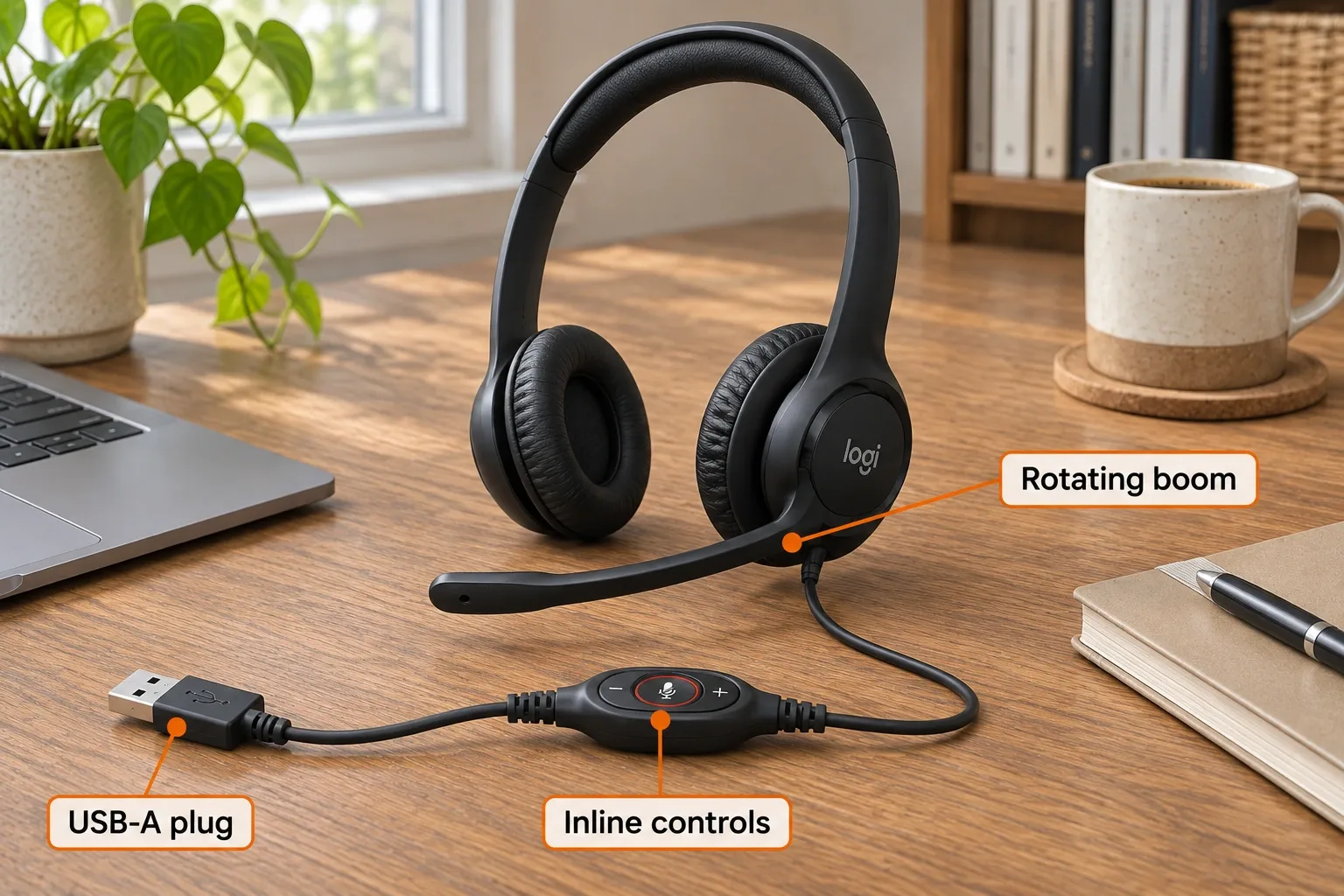
AI-generated illustration — enlarged headset, USB-A plug and inline controls identified by orange labels. Fictional scene, not an audio or comfort test. Enlarged detail.
A defined computer setup without charging
The selected USB-A plug is a straightforward match for a compatible computer that has that port. Logitech lists Windows, macOS and ChromeOS. There is no reason to treat the product as a universal phone, console or analog-jack headset just because the earcups look familiar.
Logitech specifies small 30 mm drivers, an adjustable headband and swivel-mounted leatherette cushions. These describe the construction; they do not prove how the headset will feel on another person’s head. If comfort is the main reason for replacing a headset, compare fit before focusing on brand familiarity.

AI-generated illustration — the same man using the inline controller at his desk. Fictional scene, not an audio or comfort test.
Where It Falls Short
The noise-canceling claim belongs to the microphone. It does not establish active noise cancellation for the wearer. A person asking for a quieter listening environment should compare an actual ANC specification instead of treating the words on a microphone listing as equivalent.
The wire stays part of the routine. A cable avoids charging but restricts how far the wearer can move. It also needs a clear route on the desk. We have not assessed cable durability or established that any particular handling habit causes a failure.
On-ear cushions are a personal fit choice. The owner reports below point in different directions. One person’s comfortable workday cannot establish everyone else’s experience, especially across head sizes, glasses and wearing times.
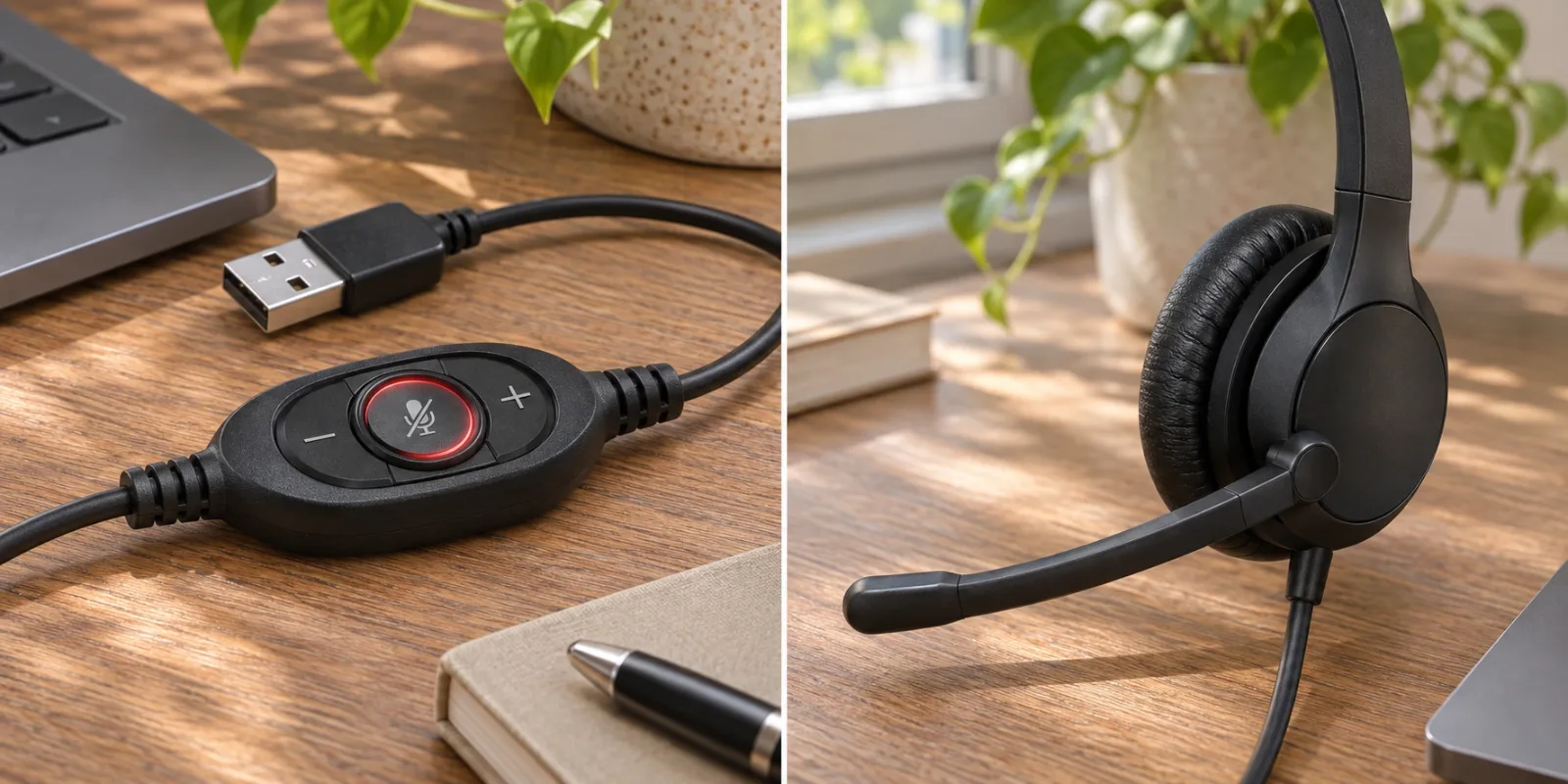
AI-generated illustration — enlarged inline controller and small earcup details. Fictional scene, not an audio or comfort test. Enlarged detail.
What Owners Say
- One owner was happy with regular use. In a May 24, 2024 AskUK comment, a person on their second H390 describes being satisfied with the current pair and wearing it for much of the day. They also identify the inline controls. Their recollection does not establish a guaranteed lifespan or the exact selected ASIN revision.
- Another owner found the pads small and uncomfortable over time. A May 5, 2026 Logitech post describes that individual fit problem. The post names H390 but does not confirm its connector or part number. It is a useful reason to consider the on-ear format, not evidence that every owner experiences discomfort.
These are firsthand reports with version limits, not a consensus or comparative audio test. We excluded deal reposts, automated summaries and generic endorsements. No promotional-sampling label was displayed in the cited discussion text checked.
Who It’s For
Consider it for a recipient who wants a wired computer voice-call accessory, has the appropriate port and accepts compact cushions resting on the ears. It can be a more thoughtful gift when it answers a specific request for inline controls or a headset that does not need charging.
Skip it when the recipient wants wireless movement, large ear-enclosing cups or listener ANC. Someone with a satisfactory headset may prefer another desk accessory entirely. A useful work gift should solve their stated inconvenience rather than create an unwanted equipment change.

AI-generated illustration — the same man beside the black headset with its cable visible. Fictional scene, not an audio or comfort test.
Alternatives at a Glance
| Alternative | Prefer it when | Check |
|---|---|---|
| A USB-C headset | The computer has no USB-A port | Exact connector and system support |
| A larger ear-enclosing model | On-ear pads are unwelcome | Actual fit, weight and controls |
| A wireless work headset | Moving away from the desk matters | Battery routine and connection |
| A separate microphone and existing headphones | The recipient already likes their listening setup | Input/output configuration and desk space |
These are format comparisons, not winners from a call-quality test.
How We Researched This
We matched the selected Amazon plug and part to Logitech’s current specification, checked the new offer and read dated public owner discussions. No audio, isolation or comfort test was conducted. The five AI-generated illustrations show one fictional adult, consistent clothing and the reference black wired headset. Logitech’s published 151 × 171 × 68 mm dimensions guide the overall scale. Detail images are enlarged; none is a microphone recording or evidence of fit. Laptop and desk items are props.
Sources
- Logitech H390 specifications, compatibility and part numbers
- Selected Amazon USB-A version and current offers
Each dated owner report has its own source link above.
FAQ
Which H390 version is covered here?
Black USB-A, part 981-000014, Amazon ASIN B000UXZQ42. Logitech also lists USB-C and other colors; match the actual connector rather than assume every H390 is identical.
Does the microphone cancel the noise I hear?
The noise-canceling feature describes the microphone used for voice capture. It is not a claim of active noise cancellation for sound reaching the listener’s ears.
Does raising the boom mute a call?
Use the inline microphone-mute control. The boom can rotate out of the way, but the manufacturer’s comparison does not list flip-to-mute for this model.
Which computers are listed as compatible?
Logitech lists Windows, macOS and ChromeOS with the appropriate USB connection. This selected unit has USB-A; do not assume a USB-C-only device can accept it directly.
How long is the cable, and is it wireless?
Logitech’s current specifications list 1.9 metres. It is a wired headset, without Bluetooth freedom or a battery runtime to manage. Older listing material can differ, so check the delivered version.
Price and purchase links
You might also like

Electronics
Product analysisLogitech K400 Plus Review: A Couch-PC Gift With a Receiver Catch
A compact keyboard and touchpad can simplify a living-room PC, but the USB receiver, unlit keys and older owner reports deserve attention before gifting.
Electronics
Product analysisBluelounge CableDrop Review: Stop Fishing for Cords Behind Your Desk
A small desk upgrade for keeping loose charging leads within reach. We examine the black two-pack listing, cable-fit differences and the adhesive trade-off.

Home & Kitchen
Product analysisClover Desk Needle Threader Review: Check the Needle Before Buying the Gift
A small tabletop helper for compatible hand-sewing needles, with a narrower compatibility range than some retail descriptions suggest.
Electronics
Product analysisKensington Orbit K64327F Review: A Small-Desk Gift With One Big Scrolling Catch
Consider this Orbit for a recipient who wants a stationary, finger-operated pointer and does not mind adapting their scrolling routine.