Mini Cable Organizer Review: Can Clips Keep Chargers On Desks?
30-second verdict
Mini adhesive cable clips shine for desk-edge charger heads—verify stick and diameter; use raceways for heavy runs.
Good for
- People whose chargers drop into desk gaps
- Users who color-code cable heads
- Shoppers fine testing with thinner public adhesive specs
Not for
- Dusty or rough surfaces holding heavy cords
- People needing full power-cable bundles held
- Precious desktops that forbid any residue
Buying Guide Notes · First published:
Compiled from public sourcesWritten using published specs and user feedback.

Sources and verification status
Verification status: compiled from public sources; not hands-on tested
Data updated:
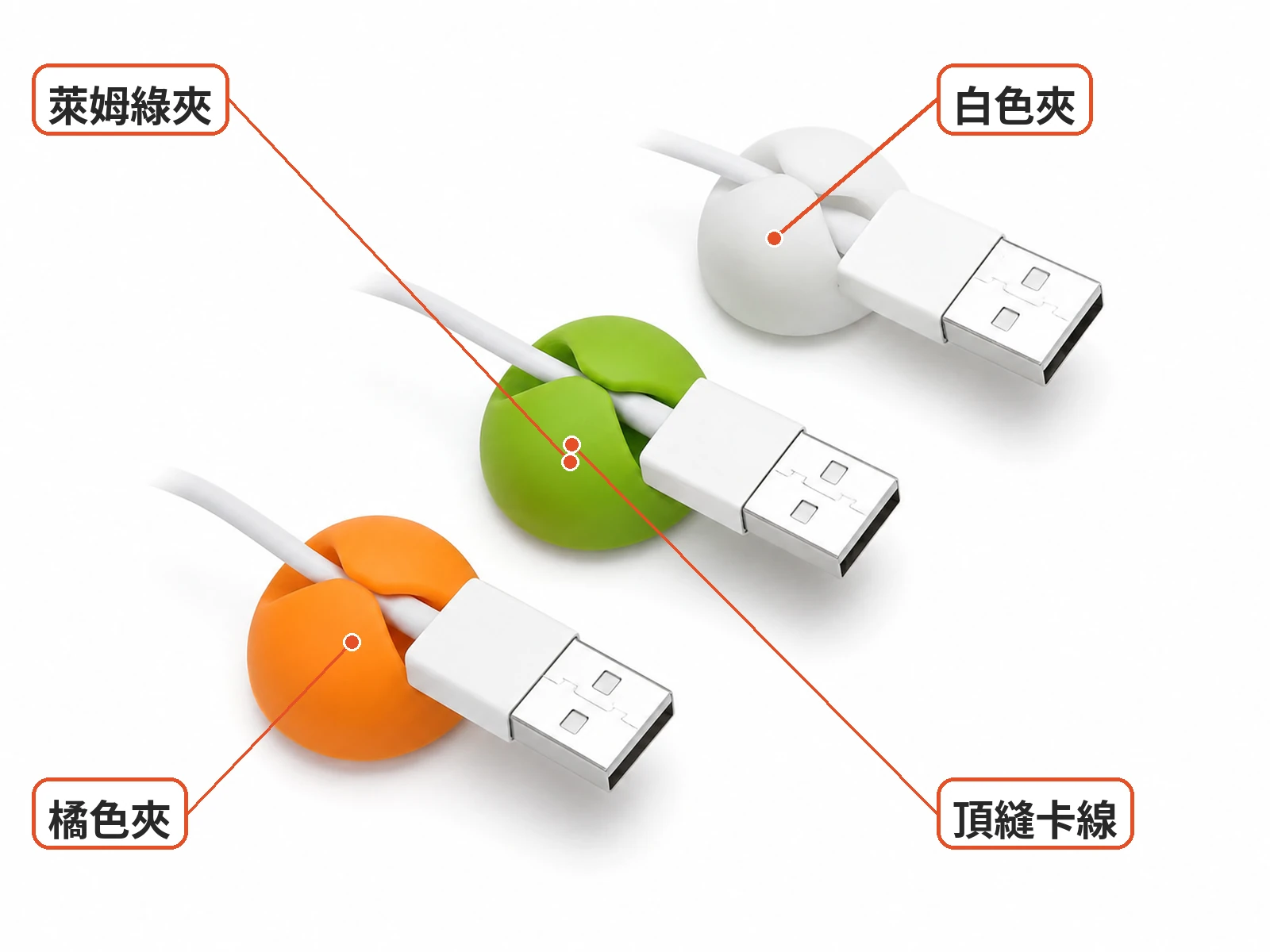
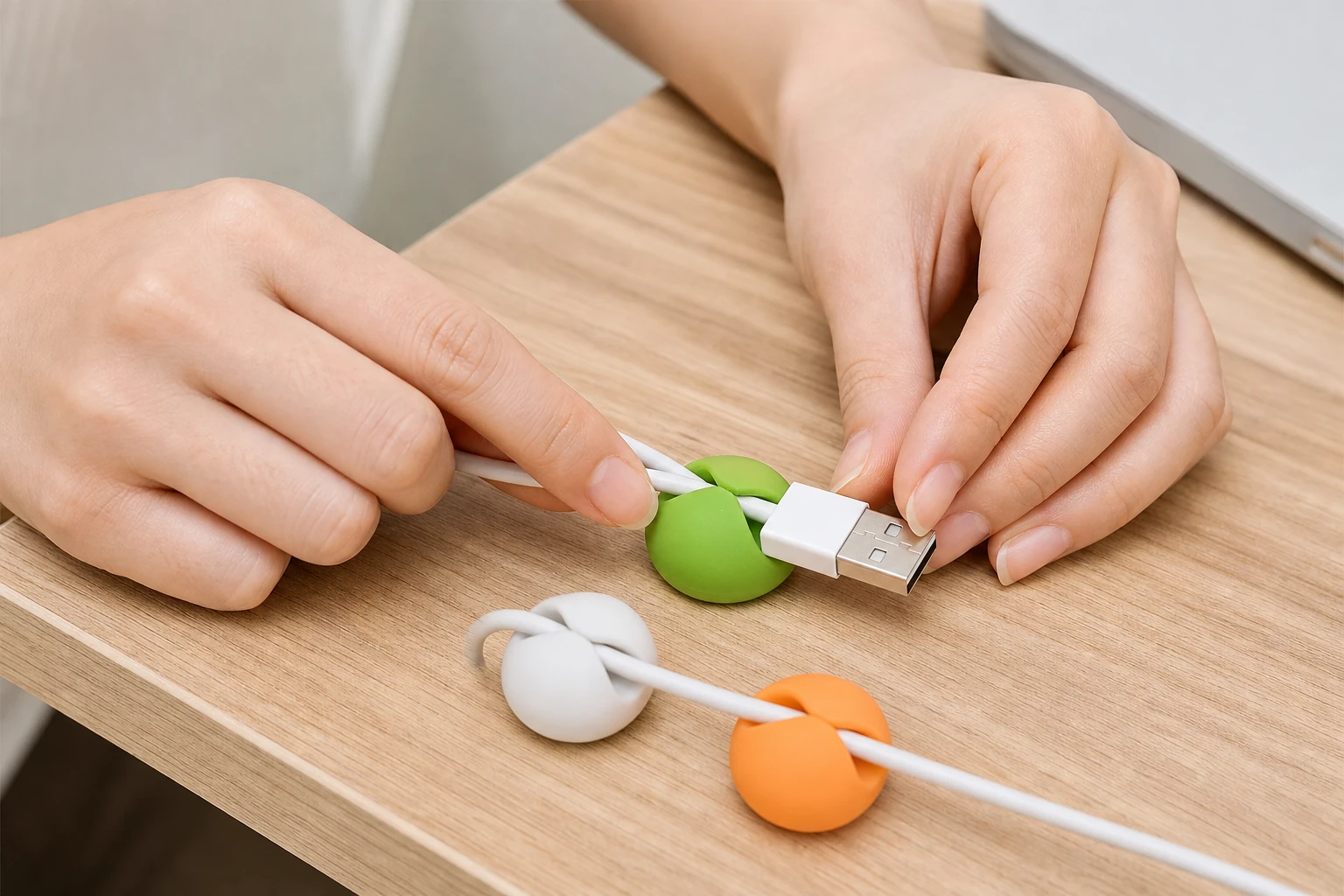
A charging cable can slip into the gap beside a desk as soon as you put it down. This mini adhesive cable organizer is designed to keep it nearby: stick the small silicone dome to the desk edge and press the cable into its top slit. The clips are shown in white, lime green and bright orange, and the listing mentions single- and dual-hole options.

This is neither a long raceway for concealing cables nor a magnetic dock. It is intended to give an often-used cable a place to stay. A bundle of power cords under the desk may still need a raceway or ties.
Who Are These Mini Adhesive Cable Clips For?
The clips may appeal to people whose charging cables keep falling beside a desk, bed or sofa. Their small size leaves plenty of desk space, and different colors can help distinguish cables.

Compatibility depends on the cable and the slit. The listing does not state a supported diameter range, so you can measure your cable and check the fit when the clip arrives. A thick cable may not fit, while a thin one could slip out.
The clip may not be a good match for heavy cables on dusty or rough surfaces, or for a valuable desktop where any residue would be unacceptable. Adhesive strength and long-term drop rates are not specified. Consider testing an inconspicuous area first and checking the surface after removal.

Practical Considerations: Can It Keep Cables At The Desk Edge?
The intended method is straightforward: clean and dry the surface, attach the adhesive base and press the charging cable into the slit. Remove the cable when needed and return it afterward. The listing shows approximately 2,000+ sold, but that count does not establish how well the adhesive performs on every surface.

Choose a spot near where the cable normally falls and leave enough room for the cable to bend without being forced. Dust, oil and rough finishes can affect adhesion, and a clean-looking surface alone does not guarantee a secure hold. If the desk is shared or rented, consider how and when the clip will need to come off.

When removing a cable from the slit, avoid prying the adhesive base sideways. Do not rely on one mini clip to suspend a heavy cable or a power adapter, and avoid pulling power cords tight against their outlets. The clip is intended to position a cable, not carry the weight of a whole bundle.
The listing mentions single- and dual-hole versions, although photos often show a single-slit dome. If you want to hold two cables, confirm the selected option and what will actually be shipped. Check the quantity and colors too: an image showing three colors does not mean every pack contains all three.
The adhesive material, temperature tolerance and residue behavior are not specified. After the clip arrives, inspect the slit and adhesive surface and try it with a light charging cable. A spot test can help assess removal on a valuable surface, although it cannot guarantee that longer use will leave no residue.
For several cables, different clip colors can make identification easier. A single-hole clip is not intended to hold a whole bundle; a raceway can organize longer runs while the small clips keep frequently used cable ends within reach.
What Users Say
A PTT discussion about under-desk cable management mentions raceways, double-sided tape and ties, with attention to adhesive strength. It is useful context for planning cable routes, not evidence of this clip's lifespan.
In a Dcard discussion of magnetic cable holders, users discuss convenient magnetic access and potentially loose retaining rings. A Mobile01 wall-cable discussion considers raceways and residue. These are discussions of related solutions, not tests or buyer reviews of this particular clip.

Similar Alternatives
- Adhesive raceways or J-channels: an option for grouping longer cable runs under a desk; consider the surface and eventual removal.
- Magnetic cable docks: a different way to pick up and return cables; check whether the retaining rings fit your cables.
- Hook-and-loop ties and hooks: useful for adjustable bundles, though they may not replace a dedicated holder for an individual cable at the desk edge.

Consider whether you need to hold a cable end, route a long cable or gather an entire bundle. A small clip can help with the first task, but a few domes alone may not resolve a crowded collection of cables under a desk.
Pre-Purchase Checklist
- Check the appearance, color options and quantity included.
- Confirm the single- or dual-hole option and what will be shipped.
- Choose a clean, dry surface; dusty walls and rough finishes may not hold well.
- Check your cable's thickness. The supported diameter is unspecified, so measure and test the fit after arrival.
- Consider possible residue and spot-test an inconspicuous area on a valuable desktop.
- Check the option, shipping origin, return terms and warranty information.

Specs
| Item | Detail |
|---|---|
| Product | Mini adhesive cable organizer clip |
| Look | Small silicone dome clips in white, lime green and bright orange; top slit grips a USB cable head; adhesive base; the listing also mentions single/dual holes |
| Common use | Clean and dry the desk edge, attach the clip, press the charging cable into the slit, remove it for use and return it afterward |
| Sold (from sales count) | About 2,000+ sold |
| Open gaps | Adhesive material and strength data, cable-diameter range, single vs dual-hole fulfillment, residue and heat tolerance, long-term drop rate |
Pros
- Gives an often-used charging cable a place at the desk edge.
- White, green and orange colors can help distinguish cables.
- Small size takes up little desk space.
Cons
- Adhesive strength and supported cable diameters are unspecified; dusty walls or thick cables may not work.
- A single-hole clip is not suited to bundles; heavier cables may need a raceway or ties.
- Removal may leave residue, so test valuable desktops first.
Where To Buy
FAQ
How long will the clip stay attached?
The listing does not provide adhesive strength or long-term drop-rate data, so its lifespan is unknown. Clean and dry the surface first, and do not suspend a heavy cable from one clip.
Should I choose a single- or dual-hole clip?
The listing mentions both, while photos often show a single-slit dome. If you need to hold two cables, confirm the option and what will be shipped.
Can it hold an Ethernet cable on a wall?
The mini clip is primarily intended to hold a cable near a desk edge, not organize an entire exposed wall run. A Mobile01 discussion mentions raceways; wall material and adhesion also need consideration.
How is it different from a magnetic cable dock?
This clip holds a cable in a slit, while a magnetic dock uses magnets. Dcard users discuss convenient magnetic access and potentially loose retaining rings.

You might also like

Tech & Gadgets
Product analysisBaseus 240W Cable Review: Can It Connect a Laptop to a Monitor?
Baseus Tungsten Gold 240W focuses on high-power PD fast charging for people whose laptop and phone both use USB-C; just remember it is USB 2.0 before buying.
NT$250

Home & Living
Product analysisPinwu Magnetic Disc Review for Renters: Will a Power Strip Fall?
Round magnetic discs look grab-and-go, but hold strength still depends on flat walls and how heavy the remote or strip is.
NT$40

Tech & Gadgets
Product comparisonBest USB-C Chargers 2027: 4 Picks for Charging Laptop and Phone
How do you match USB-C chargers, power banks and cables so the wattage adds up? We compare the Anker 67W, Anker Prime 200W, a magnetic power bank and the Baseus 240W cable on ports, output and limits.

Tech & Gadgets
Product analysisMagnetic Power Bank Review: Is iPhone Wireless Charging 22.5W?
Purple body, magnetic charging, and a percentage display make this handy for quick commuter top-ups; brand, wattage, BSMI, and flight rules still need checking before checkout.
NT$438