Best USB-C Chargers 2027: Pairing Chargers, Banks and Cables
30-second verdict
How do you match USB-C chargers, power banks and cables so the wattage adds up? We compare the Anker 67W, Anker Prime 200W, a magnetic power bank and the Baseus 240W cable on ports, output and limits.
Buying Guide Notes ·
Compiled from public sourcesCompiled from official specs and user feedback.

Pros
- Covers a travel charger, a desktop station, a power bank and a high-wattage cable.
- Both Anker chargers have BSMI numbers and Taiwan warranties.
- The Baseus cable's E-Marker leaves headroom for laptops.
Cons
- The A2674 drops to 65W total with two ports.
- The A2683 weighs about 563 g.
- The power bank lists no brand; the cable is USB 2.0 only.
Price and purchase links
How do you match USB-C chargers, power banks and cables so the wattage adds up? We compare the Anker 67W, Anker Prime 200W, a magnetic power bank and the Baseus 240W cable on ports, output and limits.
Price updated 2026/11/03
Where to buy
- Anker A2674 67W: NT$690 | See the lowest price →
- Anker Prime 200W A2683: NT$2690 | See the lowest price →
- Magnetic power bank: NT$438 | See the lowest price →
- Baseus 240W cable: NT$250 | See the lowest price →
Prices change often.
Specs
| Product | Ports | Output | Size / weight |
|---|---|---|---|
| Anker A2674 | 2C1A | 67W single, 65W two-port total, USB-A ~22.5W | About 54×45×39 mm, 132 g |
| Anker Prime A2683 | 4C2A | 200W total, 100W per C, USB-A 22.5W | About 112×76×35 mm, 563 g |
| Magnetic power bank | Wired + magnetic | Up to ~22.5W wired, 10000mAh | Not listed |
| Baseus 240W cable | USB-C to USB-C | Up to 240W PD3.1, USB 2.0 data | 1 / 2 / 3 m |
When a laptop, phone and earbuds all need charging, the most common question is how to match USB-C chargers, power banks and cables so the wattage adds up. Charger, cable and device have to be considered together, because the weakest link sets the speed. This page compares four charging products reviewed on our site on ports, output and limits before buying.
How to choose a USB-C charger
Actual charging power is negotiated between charger, cable and device, and the lowest one wins. A laptop that accepts 65W will not charge faster from a bigger charger, and a 100W charger on a 60W cable only delivers 60W.
- One laptop plus phone and earbuds: a multi-port charger around 65W; check how total output splits.
- Lots of devices on a desk: a multi-port desktop station keeps cables in one place, but is bigger and heavier.
- Topping up a phone on the go: a magnetic power bank needs no cable, but wireless charging loses energy and runs warmer.
- Laptops above 100W: use a USB-C cable with an E-Marker rated for that wattage.
USB-C charger comparison table
| Product | Type | Price | Best for | Watch out |
|---|---|---|---|---|
| Anker A2674 67W | 3-port GaN charger | About NT$690 | Laptop plus phone | 65W total with two ports |
| Anker Prime 200W A2683 | 6-port desktop charger | About NT$2,690 | Many devices on a desk | About 563 g |
| Magnetic 10000mAh 22.5W power bank | Magnetic power bank | About NT$438 | Commuter top-ups | No brand listed |
| Baseus Tungsten Gold 240W cable | USB-C to USB-C cable | About NT$250 | High-wattage laptop charging | USB 2.0 data only |
Anker A2674 67W GaN charger
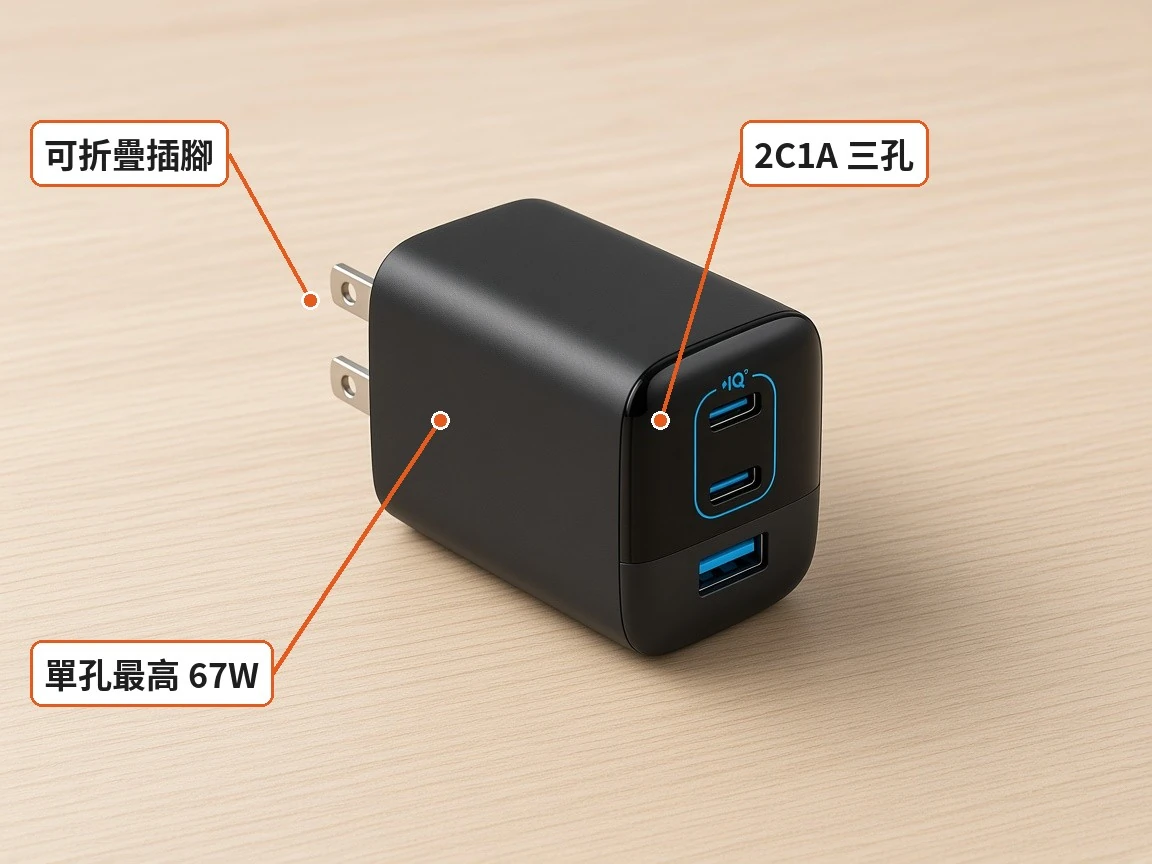
The Anker 336 series A2674 has two USB-C ports and one USB-A. Per Anker Taiwan, one port delivers up to 67W and two ports share 65W total; with all three in use, power is redistributed. USB-A tops out around 22.5W.
It has ActiveShield 2.0 and PowerIQ 3.0, BSMI R31310, an 18-month warranty extended to 24 months after registration, foldable prongs, and measures about 54×45×39 mm and 132 g.
Best for: one thin-and-light laptop, a phone and earbuds from a single charger.
Not for: high-power laptops, and it is not the smallest in its class. Check the listing for whether a cable is included.
NT$690 | See the lowest price →
Full review: Anker A2674 67W GaN Charger Review: Is It Enough to Charge a Laptop and Phone Together?

Anker Prime 200W 6-port charger A2683
The A2683 has four USB-C and two USB-A ports with 200W total, so desk cables stay in one place. Anker lists up to 100W per USB-C and 22.5W per USB-A, shared automatically when several devices are plugged in.
It measures about 112×76×35 mm, weighs about 563 g, includes a 1.5 m power cord and accepts 100–240V. Reaching 100W needs a 5A E-Marker USB-C cable. BSMI R45351; 18-month warranty, 24 months with registration.
Best for: desks with a laptop, phone, tablet and earbuds charging in turns.
Not for: daily carry, and it costs more than basic chargers.
NT$2690 | See the lowest price →
Full review: Anker Prime 200W Charger A2683 Review: How Is Power Split Across Six Ports?
Magnetic 10000mAh 22.5W power bank
A magnetic power bank snaps on and starts charging without a cable. This purple one has a percentage display, lists 22.5W wired fast charging plus magnetic wireless charging, and costs about NT$438 with 3,000+ sold.
No brand is listed, so check the wattage and BSMI number before buying. The 22.5W figure is usually wired; wireless output is lower and tends to run warmer. Usable capacity is always below 10000mAh. The seller says it is flight-friendly, but airline Wh rules still apply.
Best for: commuters who want quick top-ups and a visible battery level.
Not for: laptop charging, or anyone who needs clear brand, certification and warranty details.
NT$438 | See the lowest price →
Full review: Magnetic Power Bank Review: How Many Full iPhone Charges From 10000mAh at 22.5W?

Baseus Tungsten Gold 240W USB-C cable
Rated up to 240W PD3.1 with a built-in E-Marker, zinc-alloy connectors and a nylon braid, in 1, 2 or 3 m. About NT$250 with 8,000+ sold.
Real output depends on the charger and device; a cable cannot add power. ChargerLAB logged about 136W under PD3.1 loads. Data is USB 2.0 (about 480 Mbps), with no video output.
Best for: laptops that need 100W or more, paired with a high-wattage charger.
Not for: one cable for charging, monitors and fast file transfer. Confirm warranty details before buying.
NT$250 | See the lowest price →
Full review: Baseus Tungsten Gold 240W Cable Review: Does the Average User Need 240W?

How to combine them
Travel light: the A2674 plus a 100W-capable USB-C cable. Desk setup: the Prime 200W with the Baseus 240W cable for the laptop. Commuting: a magnetic power bank for the phone. In every case, check your devices' maximum wattage first.
FAQ
Is a 67W charger enough for a laptop and phone together?
For the A2674, one port gives up to 67W and two ports share 65W, enough for most thin-and-light laptops plus a phone.
Will a 240W cable make my laptop charge faster?
No. A cable cannot add power; the charger and device set the output.
Do I need a special cable for 100W?
Yes, a 5A USB-C cable with an E-Marker.
How many phone charges does a 10000mAh magnetic power bank give?
You cannot convert directly; usable capacity is lower than the label, and wireless charging loses energy.
Can I take a power bank on a plane?
Usually only in carry-on luggage and within your airline's Wh limits. Check before you fly.
Some images are AI-generated illustrations
FAQ
Is a 67W charger enough for a laptop and phone together?
For the A2674, one port gives up to 67W and two ports share 65W, enough for most thin-and-light laptops plus a phone.
Will a 240W cable make my laptop charge faster?
No. A cable cannot add power; the charger and device set the output.
Do I need a special cable for 100W?
Yes, a 5A USB-C cable with an E-Marker.
How many phone charges does a 10000mAh magnetic power bank give?
You cannot convert directly; usable capacity is lower than the label, and wireless charging loses energy.
Can I take a power bank on a plane?
Usually only in carry-on luggage and within your airline's Wh limits. Check before you fly.

You might also like

Tech & Gadgets
Shop owner's pickANENG Monitor Light Bar Review: 33cm or 50cm?
Bright screen, dark desk? Pick the right length and make sure the clamp clears your webcam before buying this ANENG light bar.

Tech & Gadgets
Shop owner's pickMultipurpose Cleaning Gel Review: Will It Leave Residue in Key Gaps? Is It Safe on Mechanical Switches?
Dust stuck in your key gaps but worried about residue? This bright blue cleaning gel costs NT$5. Learn how to test it and use it on a mechanical keyboard before you stock up.

Tech & Gadgets
Shop owner's pickPOLYWELL Dual-Interface Card Reader Review: USB-A Plus Type-C, Do Both Ends Work?
Need to move camera cards to a laptop and a phone? The POLYWELL card reader has USB-A on one end and Type-C on the other. Check the slots and ports first, then think about speed.

Tech & Gadgets
Shop owner's pickUSB Bluetooth 5.0 Adapter Review: Plug Into a Desktop and Pair Right Away?
Desktop missing Bluetooth? This adapter is printed V5.0, so ignore the 5.3 in the title, and make sure you are not buying an audio transmitter.
Some images are illustrative.